Cubase Dongle Emulator
Source code CHANGELOG Report BUG v1.0.0
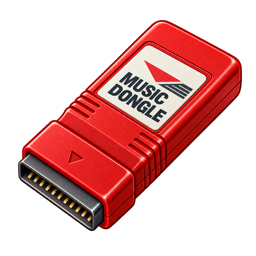
This microfirmware app for the SidecarTridge Multi-device platform emulates the Steinberg Cubase copy-protection dongle on real Atari hardware, so you can run Cubase without the original (and often failing, 30-year-old) hardware key.
The Multi-device plugs into the cartridge port and answers ROM3 accesses exactly like the original dongle. You select the dongle family from the boot menu and it launches straight into GEM.
See the Cubase Dongle Emulator in action:
Table of contents
⚠️ Legal note
This project exists for research and to study how these copy-protection dongles worked. It is an interoperability and preservation tool, not a way to obtain Cubase. You must own a legitimate copy of the Cubase software the dongle was made for, and you should use this only with software you own.
Neither dongle is a stored key. Both are reproduced from cross-checked hardware descriptions of the original logic.
🎛️ Supported dongles
This release emulates two Steinberg Cubase dongles: the Cubase 3 “red dongle” (Intel 5C060 / EP600 PLD, a 16-bit registered state machine) and the Cubase 2 “black dongle” (an 8-bit registered state machine clocked on every bus cycle). Pick the family from the boot menu.
| Dongle family | Cubase versions | Status |
|---|---|---|
| Cubase V3 (red, Intel 5C060) | Cubase 3.0, 3.01, 3.10, Cubase Score 2.x | ✅ shipping |
| Cubase V2 (black) | Cubase 2.0, 2.01, 2.2x | ✅ shipping |
| Cubase V1 | Cubase 1.0 / 1.50 / 1.51 | planned |
| Cubase Audio Falcon | CAF 2.01 / 2.02 / 2.06 / 3.01 | planned |
Verified on hardware: Cubase 3.10 and Cubase Score 2.0 (red) and Cubase 2.01 (black) all accept the emulated dongle and run.
Supported machines: Atari ST, STE, MegaST, MegaSTE, TT, Falcon.
🚀 Installation
To install the Cubase Dongle Emulator on your SidecarTridge Multi-device:
- Launch the Booster App on your SidecarTridge.
- Open the Booster web interface in your browser.
- Go to the Apps tab and select Cubase Dongle Emulator from the list.
- Click Download to install the app to your SidecarTridge’s microSD card.
- Once installed, select the app and click Launch.
If you are new to installing microfirmware apps, see the Apps Catalog and the User Guide for the full Booster workflow.
🕹️ Usage
On power-on the boot menu appears:
Cubase Dongle Emulator - v1.0.0

Emulated dongle: Cubase V3
 - Cubase 3.0
 - Cubase 3.01
 - Cubase 3.10
 - Cubase Score 2.x

For research and study only.
Use only with Cubase software you own.

[D] Change dongle

[E] Enter GEM   [X] Back to Booster

Select an option:
 Booting GEM in 20 seconds...
- [E]: commit to the selected dongle and boot GEM. Launch Cubase and it finds the dongle.
- [X]: return to the Booster app.
- [D]: change the dongle family. This option appears once more than one family is available.
- A countdown auto-boots GEM with the selected dongle. Any key stops it.
The physical SELECT button returns to this menu (short press) or to the Booster (long press), and it works while Cubase is running.
🛠️ Under the hood
The emulator reproduces each dongle as a hardware state machine rather than replaying a captured key.
- Red dongle (V3): the response path is zero-CPU. A PIO program keeps the state machine’s state in a scratch register, and two chained DMA channels do the lookup and next-state feedback. No CPU sits on the per-access path, which removes the cartridge-bus timing race under Cubase’s fast read bursts. The state machine compresses to a ~24 KB lookup table, generated and regression-tested by the repository’s tooling.
- Black dongle (V2): an 8-bit state machine that advances on every bus cycle, clocked on
/UDS. One PIO plus a core continuously track the machine (its 2 KB table is verified over all 65,536 transitions), while a second PIO drives the response on each ROM3 read via the same DMA fetch trick. - The firmware is deliberately slim, with no Wi-Fi, microSD, USB or status LED.
The raw reverse-engineered sources are not published. Only the derived, verified lookup tables, the golden test vectors, and a SHA-256 provenance manifest ship in the public repository.
License
This project is released under the GNU General Public License v3.0. See the LICENSE file for details.
🤝 Contributing
Made with ❤️ by SidecarTridge