Compatibility
You should read this section to ensure that your Atari Mega ST motherboard is compatible with the SidecarTridge TOS 256KB decoder. The decoder works with any SidecarTridge TOS Emulator whose carrier board has a connector for it. If your motherboard is not listed, or if you have any doubts about compatibility, please contact us for further assistance.
Table of contents
Supported Atari Mega ST Motherboards and Carrier Boards
Carrier boards for unsupported motherboards are in active development. Please check the SidecarTridge website for updates.
Carrier boards and cables
The 256KB Decoder + TOS Emulator Combo comes with everything needed. For a TOS Emulator you already have, compatibility depends on the connector for the decoder on its carrier board, and the cable that goes with it. Look at your carrier board, the board in the ROM sockets under the ROM Emulator board, and find the connector for the decoder. It tells you which decoder to order:
| Connector on your carrier board | Cable | Order |
|---|---|---|
| 6-pin flat-cable connector | 6-pin flexible flat cable (FFC) | 256KB Decoder, For REV 4.0.0 |
| 2x3 pin IDC header | 6-pin flat cable with IDC plugs | 256KB Decoder, For REV from 2.1.0 to 4.0.0 |
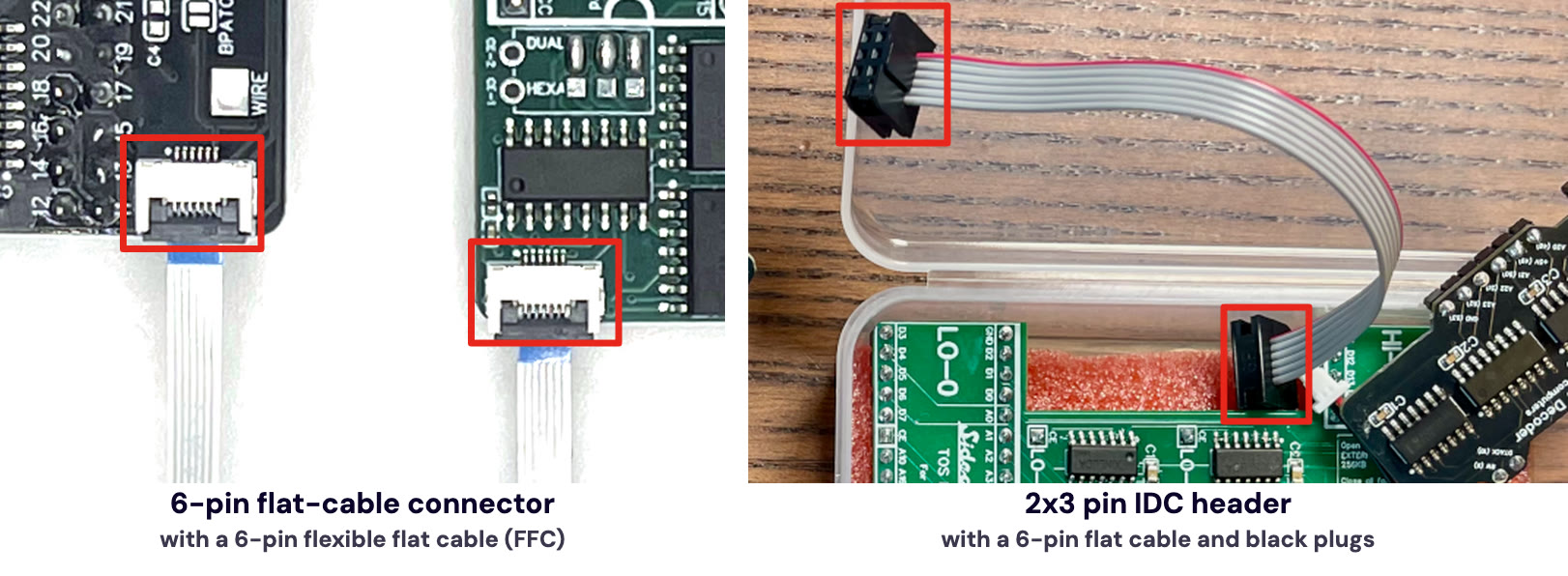
With a 2x3 pin IDC header, also check that the chip labelled MUX is fitted on the left of the connectors. If it is missing, or if your carrier board has neither connector, the decoder does not work with it as it is: see Upgrading an older Mega ST carrier board, or contact us.
The ROM Emulator board on top does not matter: the decoder only connects to the carrier board.
The discontinued decoders soldered to the CPU have their own installation page, kept for reference.
| Motherboard Model Number | Number of ROMs | Status |
|---|---|---|
| C100167-001 Rev. 4.0 | 2 | Supported |
| C100167-001 Rev. B | 2 | Supported |
| C100167-001 Rev. 5.0 | 2 | Supported |
| C100501-001 | 2 | Supported |
| C103277 Rev 2.2 | 2 | Supported |
| C103544-001 | 2 | Supported |
If you can’t find your motherboard model number in the list, or have any doubts about compatibility, please contact us for further assistance.
List of supported TOS versions tested with the SidecarTridge TOS emulator
Please read the Compatibility section of the SidecarTridge TOS emulator for a list of supported TOS versions.