Amiga Forever Kickstart ROM Conversion Guide
This guide provides step-by-step instructions on how to convert Amiga Forever Kickstart ROM files into a format compatible with the SidecarTridge Kickstart emulator for Commodore Amiga 500/2000. By following these steps, you will be able to create ROM images that can be used with the emulator.
Table of contents
Prerequisites
Before starting the conversion process, ensure you have purchased the Amiga Forever Plus Edition, which includes the necessary Kickstart ROM files. You will also need a computer with internet access and web browser.
Finding the Kickstart ROM Files in Amiga Forever
The ISO image of Amiga Forever Plus Edition contains the Kickstart ROM files needed for the conversion. Follow these steps to locate the ROM files:
- Download the Amiga Forever Plus Edition ISO image from the official website.
- Mount the ISO image on your computer using a virtual drive software. No need to burn it to a physical disc.
- Navigate to the mounted ISO image to the folder path:
Amiga Files\Shared\rom.
Inside the rom folder, you will find various Kickstart ROM files with the .rom extension. You will also find a rom.key file that contains the decoding key for the encoded ROM files.
Only the ROM files licensed to Cloanto are encoded and require decoding using the rom.key file. Other ROM files are provided in their original format and do not require decoding.
Converting the Kickstart ROM Files
To convert the Kickstart ROM files into a format compatible with the SidecarTridge Kickstart emulator, simply open the online conversion tool available at our website.
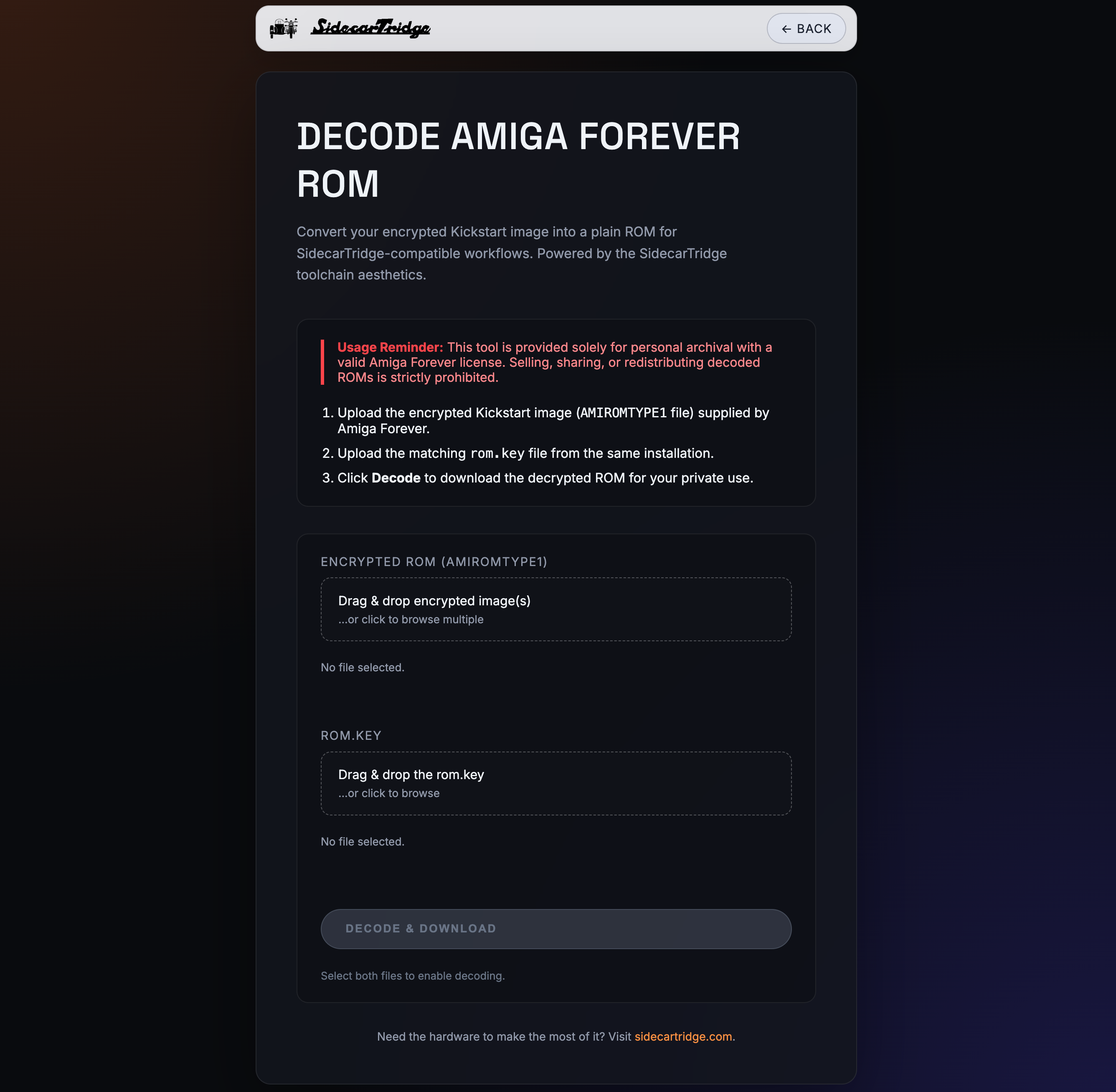
To begin the conversion process, first drag and drop or select multiple Kickstart ROM files from the Amiga Forever rom folder into the conversion tool. Then upload the rom.key file by selecting it from the same folder or dragging and dropping it into the designated area in the conversion tool.
Once the files are uploaded press the “DECODE & DOWNLOAD” button. The tool will decode the encoded ROM files using the provided key and package all the converted ROM files into a single ZIP archive for easy download. If any errors occur during the conversion process, they will be displayed in the “Errors” section of the tool. If only one file is uploaded, the tool will provide the converted ROM file directly for download without packaging it into a ZIP archive.
What the converter does (and does not do)
The web converter is built exclusively for Amiga Forever images that carry the AMIROMTYPE1 header. For each uploaded file it:
- Verifies the
AMIROMTYPE1header at the start of the file. Files without that header are rejected with anot an AMIROMTYPE1 encoded imageerror. - XOR-decodes the payload using the bytes from
rom.key, cycling through the key as needed. - Auto-mirrors small ROMs. If the decoded payload is 256KB or smaller, the converter pads it to 256KB with zeros and then duplicates the block, returning a 512KB image that the emulator can use as-is.
- Leaves larger ROMs as-is. If the decoded payload is larger than 256KB (the typical 512KB Kickstart 2.04, 2.05, 3.0, 3.1 case), the output is the decoded data without padding or duplication.
The mirror behaviour matches what real Amiga motherboards do natively when they map a 256KB Kickstart into a 512KB ROM socket. The SidecarTridge Kickstart emulator does not perform that mirror in firmware, so the converter does it for you when it can.
Already-decoded Kickstart ROMs
The web converter is not the right tool if your Kickstart ROM is already a plain (decrypted) .rom or .img file, for example a personal chip dump or a file you obtained outside Amiga Forever. The converter will reject anything that does not start with the AMIROMTYPE1 header.
Handle these images directly:
- Plain 512KB ROM (Kickstart 2.04 and later, custom ROMs such as DiagROM or EmuTOS): copy the file directly to the
ROMEMULvolume and setDEFAULT.TXTto its filename. No conversion is needed. Plain 256KB ROM (Kickstart 1.1, 1.2, 1.3 and similar): the image must be mirrored to 512KB before being copied to
ROMEMUL. The emulator does not auto-mirror on boot; this is by design. Duplicate the file with one of the following one-liners:# macOS or Linux cat kick13.rom kick13.rom > kick13_512kb.rom# Windows PowerShell $bytes = [IO.File]::ReadAllBytes('kick13.rom') [IO.File]::WriteAllBytes('kick13_512kb.rom', $bytes + $bytes)The resulting
kick13_512kb.romwill be exactly 524288 bytes (512KB) and contain the original ROM twice back to back, matching the layout the emulator expects.
After mirroring, copy kick13_512kb.rom to ROMEMUL and set DEFAULT.TXT (or use SWITCHER) to point at the 512KB file, not the original 256KB one.
Next Steps
After downloading the converted Kickstart ROM files, you can proceed to copy them to the SidecarTridge Kickstart emulator’s storage. Follow the instructions in the Getting Started section of the documentation to learn how to transfer the ROM files and configure the emulator for use with your Commodore Amiga 500/2000.
Compatibility
Make sure to check the Compatibility section of the documentation to verify that the converted Kickstart ROM files are compatible with your specific Commodore Amiga motherboard model.