Compatibility
Use this section to confirm that your Amiga model, motherboard revision, and Kickstart images will work with the SidecarTridge Kickstart Multi ROM. Start by checking your motherboard revision inside the case and matching it with the tables below. If you have any doubts, please reach out before powering on the board.
Table of contents
Firmware, SWITCHER and rescue switcher versions
v4.0.0
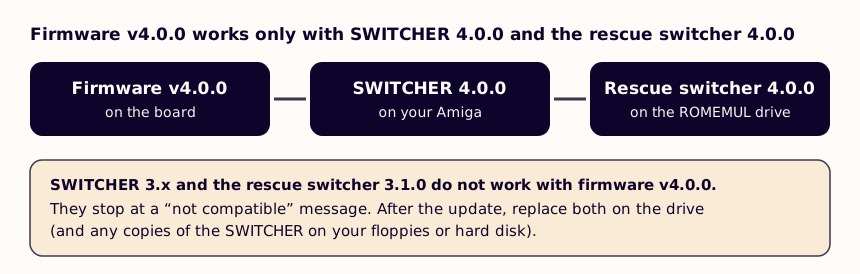
The firmware, the SWITCHER and the rescue switcher talk to each other, so their versions must match:
| Firmware | SWITCHER | Rescue switcher |
|---|---|---|
| v4.0.0 | 4.0.0 | 4.0.0 |
| v3.1.0 | 3.1.0 | 3.1.0 |
SWITCHER 3.x and the rescue switcher 3.1.0 stop with a “not compatible” message under firmware v4.0.0, and the 4.0.0 programs refuse an older firmware. When you upgrade a board, replace all three: Upgrading to firmware v4.0.0.
Supported Amiga motherboards and carrier boards
- Make sure your Kickstart ROM is socketed; if it is soldered you must add a socket before using the board (see Before You Buy).
- Board revision 4 (RP2350B) has one carrier board for every row below, in two kits: A500 rev 3 and rev 5 / A2000 rev 4.2 or earlier, and A500 rev 6 / A2000 rev 4.3 or newer / A500+ / A600. The kit’s jumper is set at the factory (Hardware Installation).
- Board revision 3 (RP2350A) came with the carrier board named in its column, made for those motherboards only.
Amiga 500 family
| Motherboard revision | ROM socket | Board revision 4: kit | Board revision 3: carrier board | Status |
|---|---|---|---|---|
| A500 rev3 | 40 pins | A500 rev 3 and rev 5 / A2000 rev 4.2 or earlier | A500 carrier rev5 and earlier | Supported |
| A500 rev5 | 40 pins | A500 rev 3 and rev 5 / A2000 rev 4.2 or earlier | A500 carrier rev5 and earlier | Supported |
| A500 rev6a | 40 pins | A500 rev 6 / A2000 rev 4.3 or newer / A500+ / A600 | A500 carrier rev6 and later | Supported |
| A500+ | 42 pins | A500 rev 6 / A2000 rev 4.3 or newer / A500+ / A600 | None | Board revision 4 only |
| A600 | 42 pins | A500 rev 6 / A2000 rev 4.3 or newer / A500+ / A600 | None | Board revision 4 only |
Amiga 2000 family
| Motherboard revision | ROM socket | Board revision 4: kit | Board revision 3: carrier board | Status |
|---|---|---|---|---|
| A2000 rev4.2 and earlier | 40 pins | A500 rev 3 and rev 5 / A2000 rev 4.2 or earlier | A2000 carrier rev4.2 and earlier | Supported |
| A2000 rev4.3 and later | 40 pins | A500 rev 6 / A2000 rev 4.3 or newer / A500+ / A600 | A2000 carrier rev4.3 and later | Supported |
If your motherboard revision is not listed, or if you are unsure whether the ROM is socketed, please contact us before purchasing or installing the emulator.
Kickstart and custom ROM compatibility
The Kickstart Multi ROM targets the classic Amiga 512KB Kickstart ROM socket and also runs custom ROMs such as DiagROM or EmuTOS. If you use Cloanto/Amiga Forever images, convert them with the Kickstart ROM conversion guide.
ROM image size requirements
The emulator presents a single 512KB ROM image to the Amiga. Every file copied to ROMEMUL and selected via DEFAULT.TXT/RESCUE.TXT (or SWITCHER) must therefore be exactly 524288 bytes (512KB).
Original Kickstart 1.x and early 2.x images are 256KB on real hardware because the original Amiga motherboards mirror those 256KB into the 512KB address space natively. The Kickstart Multi ROM does not perform that mirror in firmware, so 256KB Kickstart images must be doubled (mirrored to 512KB) in software before they can be used. This is by design and will not change in future firmware releases.
There are two ways to obtain a 512KB image from a 256KB Kickstart source:
- Encrypted Amiga Forever image (AMIROMTYPE1): use the web converter. When the decoded payload is 256KB or smaller, the converter automatically pads it to 256KB and duplicates the block, returning a ready-to-use 512KB file.
- Already-decoded plain 256KB ROM dump: the converter does not accept this kind of file. Duplicate the ROM manually before copying it to
ROMEMUL. See Already-decoded Kickstart ROMs for the exactcatand PowerShell snippets.
Files that are not exactly 512KB on ROMEMUL will either be ignored by the device or boot to a hang/black screen on the Amiga, depending on the actual size. If you see that behaviour, check the byte count of the file first.
Tested ROM images
| ROM image | Native size (KB) | Tested | Works | Notes |
|---|---|---|---|---|
| Kickstart 0.7 | 256 | Yes | No | Fails to boot properly on the emulator |
| Kickstart 1.0 | 256 | Yes | No | Fails to boot properly on the emulator |
| Kickstart 1.1 | 256 | Yes | Yes | Must be mirrored to 512KB before use |
| Kickstart 1.2 (33.180) | 256 | Yes | Yes | Must be mirrored to 512KB before use |
| Kickstart 1.3 (34.5) | 256 | Yes | Yes | Must be mirrored to 512KB before use |
| Kickstart 2.04 (37.175) | 512 | Yes | Yes | OK |
| Kickstart 2.05 | 512 | Yes | Yes | OK |
| Kickstart 3.0 | 512 | Yes | Yes | OK |
| Kickstart 3.1 (40.63) | 512 | Yes | Yes | OK |
| DiagROM 1.x | 512 | Yes | Yes | OK |
| DiagROM 2.x beta | 512 | Yes | Yes | OK |
| Logica Diagnostics 2.0 | 512 | Yes | Yes | OK |
| EmuTOS 68K 1.x | 512 | Yes | Yes | OK |
There are other custom ROMs available. The table above lists the most common ones that have been tested. If you find any other versions that work or do not work, please let us know so we can update the compatibility list. Or update it yourself by submitting a pull request on the link at the bottom of the documentation pages.
If you plan to use a ROM image that is not listed, ensure it is built for the 68000-based Amiga 512KB layout and test it with the rescue mode setup so you can recover easily.
Previous: Which board do I have? Main Next: Kickstart ROM Conversion