Upgrading to v4.0.0
v4.0.0
Firmware v4.0.0 runs on the board revision 3 (RP2350) you already have: the one with a red power LED. The upgrade keeps your TOS images and settings, and takes a few minutes. This page explains what changes and how to upgrade.
Table of contents
What v4.0.0 brings
Version 4.0.0 is three programs released together: the board’s firmware, the SWITCHER for the Atari, and the rescue switcher.
- A self-test of the board. Press
Tin the rescue switcher: it checks every address and data line between the Atari and the board, thousands of random reads, that the board answers commands, and that its flash reads back the same every time, then names your Atari model, its monitor line and its RAM. See ROM Rescue Switcher. - The rescue switcher without the RESCUE button. With
RESCUE_TIMEOUTset, switching the Atari on with its RESET button held starts the rescue switcher, handy when the button is not wired or the case is closed. See Advanced Settings. - The Atari always gets something to start. If the default TOS image cannot be used, the board starts the rescue image instead of stopping.
- SWITCHER 4.0.0: a page with the board’s settings (
C), clear messages when the versions do not match, and fixes for long sessions on 512 KB machines and for uploads. REBOOTreturns to the Atari. After an eject with aREBOOTfile, the board starts the default TOS image with the USB cable still connected.ACCELERATED_BUS, for Atari computers with an accelerator board.- A more robust
ROMEMULdrive, with many fixes, including volumes with many images copied from a Mac. - A safety check: the firmware refuses to run on a board it was not made for.
The Changelog lists every change.
Before you start
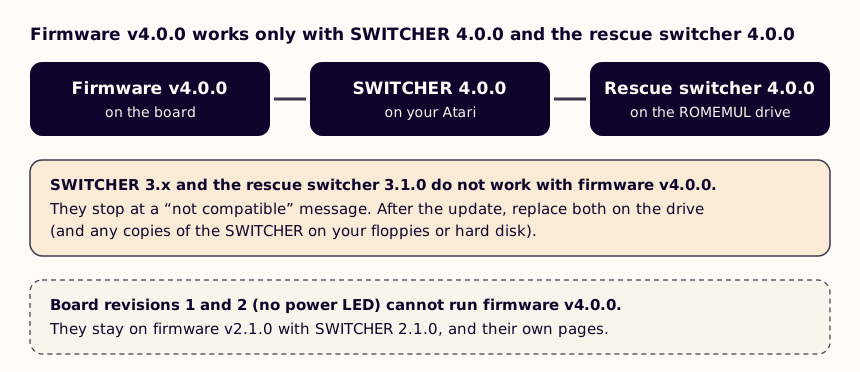
- Check your board. Firmware v4.0.0 is for board revision 3, which has a red power LED. Board revisions 1 and 2 cannot run it: they stay on firmware v2.1.0, with SWITCHER 2.1.0 and the firmware v2.x guide.
- Download the three programs from the downloads page:
- the update file,
sidecartridge-tos-rp2350a-v4.0.0.uf2; SWITCHER.TOS4.0.0;- the rescue switcher 4.0.0 for your Atari:
RESCUE_SWITCHER_v4.0.0_192KB.imgfor an ST or Mega ST,RESCUE_SWITCHER_v4.0.0_256KB.imgfor an STE or Mega STE (or an ST with the 256 KB decoder).
- the update file,
- Copy everything on the
ROMEMULdrive to a folder on your computer. The update keeps it, but a copy costs nothing.
The three programs go together: firmware v4.0.0 works only with SWITCHER 4.0.0 and the rescue switcher 4.0.0. The SWITCHER 3.x and the rescue switcher 3.1.0 already on your drive stop with a “not compatible” message once the firmware is updated, so replace them as described below.
Keep your images or start fresh
There are two ways to upgrade:
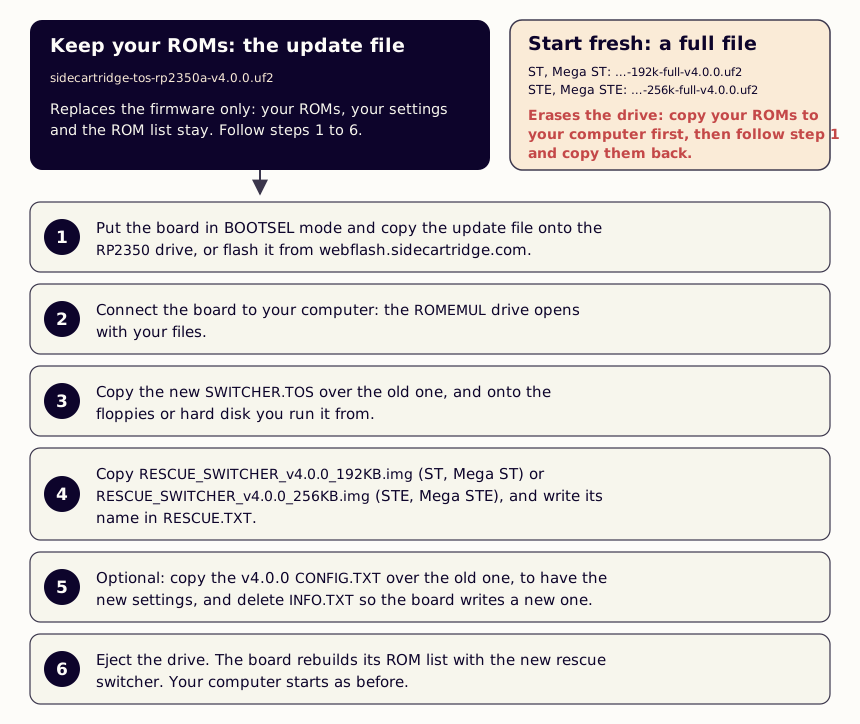
- The update file replaces the firmware only. Your TOS images, your default and rescue choices and your settings stay. Most people want this one: follow the six steps below.
- A full file erases the board and installs everything new: EmuTOS 1.4, the rescue switcher,
SWITCHER.TOSand the default settings. Use it to start from a clean board; see Upgrading with a full file.
Upgrading with the update file
1. Install the firmware
Put the board in BOOTSEL mode and copy sidecartridge-tos-rp2350a-v4.0.0.uf2 onto the RP2350 drive that appears, or install it from webflash.sidecartridge.com. Firmware installation explains both ways.
The board restarts with firmware v4.0.0. It still starts your default TOS image as before.
2. Open the ROMEMUL drive
With the Atari switched off, connect the board to your computer. The ROMEMUL drive opens with all your files.
3. Replace the SWITCHER
Copy the new SWITCHER.TOS onto the drive, over the old one. If the file you downloaded has the version in its name, rename it to SWITCHER.TOS.
Replace it too on the floppies or the hard disk you run it from on your Atari.
4. Install the new rescue switcher
- Copy
RESCUE_SWITCHER_v4.0.0_192KB.img(ST, Mega ST) orRESCUE_SWITCHER_v4.0.0_256KB.img(STE, Mega STE) onto the drive. Open
RESCUE.TXTand replace the name in it with the new one, exactly as the file is called. For example:RESCUE_SWITCHER_v4.0.0_192KB.img- Delete the old
RESCUE_SWITCHER_v3.1.0_...file, unless you want to keep it in your list.
5. Optional: the new settings and INFO.TXT
CONFIG.TXTkeeps your firmware v3.x settings,READ_BUS_TICKSandUSE_OE, and they work as before. The settings added in firmware v4.0.0 stay off until they are in the file. To have them, add these lines at the end of yourCONFIG.TXT:; Seconds with the Atari's RESET held at power-on before the rescue ; ROM starts. 0 turns it off. Allowed: 0 to 600. RESCUE_TIMEOUT = 0 ; 1 for an accelerated Atari whose ROMs crash or do not start. ACCELERATED_BUS = 0Advanced Settings shows the whole v4.0.0 file and explains every setting.
INFO.TXTstill shows the old version: the board writes it only when the drive has none. Delete it; the board writes a new one the next time you connect it.
6. Eject the drive
Eject the ROMEMUL drive. The board rebuilds its list of TOS images with the new rescue switcher and reads CONFIG.TXT. Then unplug it, and switch the Atari on: it starts your default TOS image.
Until this first eject, the board runs with the settings firmware v3.x left, which work as before. Nothing is lost if the upgrade stops halfway: start again from step 2.
Check that it worked
- Connect the board to your computer again:
INFO.TXTsaysVersion: v4.0.0andBoard variant: RP2350A. - Run
SWITCHER.TOSon the Atari: it lists your images, with theA(default) andR(rescue) marks. PressCto see the board’s settings. - Hold the RESCUE button and switch the Atari on: the rescue switcher 4.0.0 starts. Press
Tto test the board.
Upgrading with a full file
- Copy everything on the
ROMEMULdrive to a folder on your computer. The full file erases it. - Install
sidecartridge-tos-rp2350a-emutos-192k-full-v4.0.0.uf2(ST, Mega ST) orsidecartridge-tos-rp2350a-emutos-256k-full-v4.0.0.uf2(STE, Mega STE) the same way as in step 1 above. - Open the
ROMEMULdrive. It has EmuTOS 1.4, the rescue switcher 4.0.0,SWITCHER.TOS4.0.0 and the v4.0.0CONFIG.TXT. - Copy your TOS images back, and your
CONFIG.TXTvalues if you had changed them. - Eject the drive. Then choose your default TOS image with the SWITCHER, or in
DEFAULT.TXT.
If something goes wrong
- The SWITCHER says “This version of SWITCHER tool is not compatible with the firmware of the device.” It is the old SWITCHER: replace it (step 3), on the drive and on your Atari’s disks.
- The rescue switcher says the same.
RESCUE.TXTstill names the old rescue switcher: repeat step 4. - The green and orange LEDs blink together and the Atari does not start. A firmware for another board was installed: install the
rp2350aupdate file again.
The Troubleshooting page covers the rest.