Troubleshooting
This page is for the SidecarTridge Kickstart Multi ROM board with firmware v4.0.0. What changed in v4.0.0 is marked with its label.
Table of contents
- The LEDs
- The
ROMEMULdrive - The Amiga
- The SWITCHER
- The SWITCHER says it is not compatible with the firmware of the device
- “The firmware and the SWITCHER app must share the same protocol version.”
- “No ROMs found. Do you have a Sidecartrige device configured?”
- “Error reading the flash page at address …”
- “Not enough memory to list the ROM images.”
- The upload browser does not show my volume, or opens the wrong one
- The rescue switcher
- Kickstart images and the
ROMEMULdrive - Errors ejecting the
ROMEMULdrive
The LEDs
The User Guide explains every LED. These three mean something is wrong.
The green and orange LEDs blink together, and the Amiga does not start
v4.0.0
The firmware installed is for another board: a file with rp2350b in its name. The board stops before it can harm anything. Put it in BOOTSEL mode and install the rp2350a update file (Firmware installation); your ROM images are still there.
The green LED blinks on its own
The board has no ROM image it can serve: none has been chosen, or the default one is larger than 512 KB, and there is no usable rescue image either. Connect the board to your computer: it opens the ROMEMUL drive even in this state. Check that DEFAULT.TXT and RESCUE.TXT name files that are on the drive, then eject it.
The orange LED blinks on its own
The board could not read or write its drive. Unplug it and connect it again. If it keeps blinking, the drive may be damaged: copy what you can to your computer and install the full firmware file, which formats it again.
The ROMEMUL drive
The ROMEMUL drive does not appear on my computer
The board opens its drive only when a computer talks to it on the USB cable during the board’s first 2 seconds. Check, in this order:
- The cable carries data. Many USB-C cables only charge, and with those the board starts as if it were in the Amiga. We cannot stress enough the importance of a good quality USB data cable.
- The board is plugged into a computer, not a charger or a powered hub without a computer behind it. Some USB hubs work, others do not: try a port on the computer itself.
- The Amiga is switched off. If the Amiga powered the board before the cable was plugged in, the board was already serving the ROM and does not look for a computer any more. Switch the Amiga off, or press
RESETon the board with the cable plugged in: it starts again and finds your computer.
If it still does not appear, check that the board answers in BOOTSEL mode:
- Hold down the
BOOTbutton on the board. - While holding it, press and release
RESET. - Release
BOOT.
Alternatively, with the board unplugged, hold BOOT, plug the USB cable in, then release BOOT.
If the RP2350 drive appears, the board and the cable work: install the firmware again (Firmware installation). If not, try another cable and another computer.
The ROMEMUL drive is not remounted after ejecting
That is expected. After an eject the board rebuilds its list of ROM images, then waits with its green and orange LEDs off until it is unplugged. To open the drive again, unplug the board and plug it in, or press RESET on the board.
v4.0.0
A REBOOT file on the drive now makes the board start serving the ROM to the Amiga after the eject, with the cable still plugged in; before v4.0.0 it opened the drive again. See Magic file names.
Images copied from the computer are not recognized or stored correctly
Computers keep part of what they write to a USB drive in memory, and write it out later. Always eject the ROMEMUL drive when you finish: the eject writes everything out, and it is also when the board rebuilds its list of ROM images.
INFO.TXT still shows the old version after an update
The board writes INFO.TXT only when the drive has none, so an update leaves the old one. Delete INFO.TXT, eject the drive, and connect the board again: it writes a new one with the version installed.
The board does not respond to the RESET or BOOT button
Small buttons can stop responding because of dust, grease or flux. Put a little isopropyl alcohol (IPA) on the button, press it several times while it is wet, and let it dry.
The Amiga
The Amiga does not boot with the board installed
- Unplug the USB cable. If a computer is on the cable when the board powers up, the board opens its drive and the Amiga does not start. Unplug the cable, or eject the drive with a
REBOOTfile on it (Magic file names). - Look at the LEDs: see The LEDs above.
- Start the ROM the board came with. Write
DiagROM-1.3.imginDEFAULT.TXTand eject the drive. If DiagROM starts, the problem is in the other image. - Check the image size: every image must be exactly 512 KB (see below).
- Start the rescue switcher with the RESCUE button and run its self-test (
T): it checks every connection between the Amiga and the board. See ROM Rescue Switcher.
The Amiga hangs or shows a black screen with a 256 KB Kickstart (1.x / early 2.x)
The board presents a 512 KB ROM to the Amiga and does not mirror 256 KB images. A real Amiga motherboard mirrors a 256 KB Kickstart in its 512 KB socket by itself; the board does not, so with a 256 KB file the second half of the ROM is garbage and the Amiga hangs or shows nothing.
- Check the size of the file on
ROMEMUL. It must be exactly 524288 bytes (512 KB). - If it is 256 KB (262144 bytes), double it to 512 KB:
- for Amiga Forever encrypted sources, run the file through the web converter, which doubles small ROMs;
- for plain 256 KB dumps, follow Already-decoded Kickstart ROMs.
- Replace the 256 KB file on
ROMEMULwith the 512 KB one, pointDEFAULT.TXT(or the SWITCHER) at it, and eject the drive.
The SWITCHER uploads files of any size, so check the size before uploading one from the Amiga too.
The Amiga keeps its old ROM after a selection in the SWITCHER
The Amiga cannot restart itself into a new Kickstart. When the SWITCHER says “Please hard-reset or power-cycle your computer now”, switch the Amiga off and on. Holding Ctrl and both Amiga keys may do too; if the old ROM still starts, switch it off and on.
The Amiga starts, but crashes or shows a garbled screen with a ROM that works elsewhere
Run the rescue switcher’s self-test and its 30-second soak test: errors there point to a loose contact or a timing problem. If they pass, try other READ_BUS_TICKS values (Advanced Settings). On an accelerated Amiga, try ACCELERATED_BUS = 1.
The SWITCHER
The SWITCHER says it is not compatible with the firmware of the device
v4.0.0
An older SWITCHER on a board with firmware v4.0.0 stops with this message (SWITCHER 3.1.0 says “This version of SWITCHER tool is not compatible with the firmware of the device.”). Replace it with SWITCHER 4.0.0: in the AMIGA folder of the drive, and wherever you run it from (your floppy, Gotek or hard disk).
“The firmware and the SWITCHER app must share the same protocol version.”
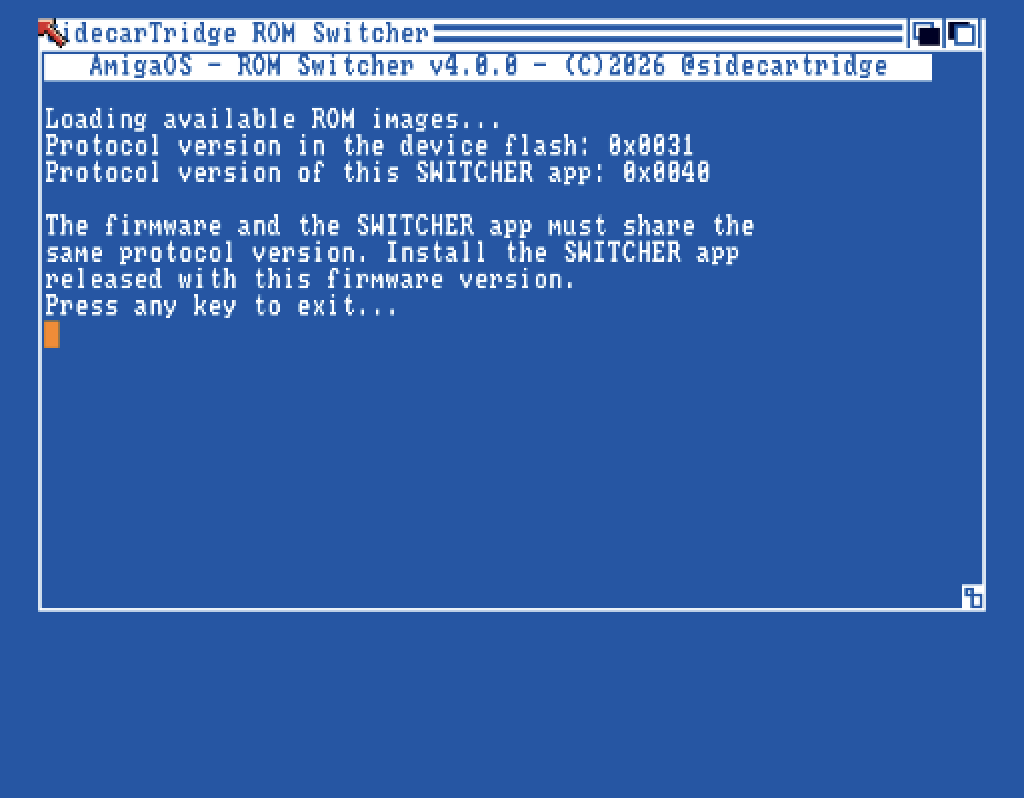
SWITCHER 4.0.0 shows this, with the two version numbers, when the board runs an older firmware. Update the board to firmware v4.0.0 (Upgrading to firmware v4.0.0), or use the SWITCHER that came with the firmware it has.
“No ROMs found. Do you have a Sidecartrige device configured?”
The board has no ROM images, so there is nothing to list. Copy at least one image to the ROMEMUL drive from your computer first.
“Error reading the flash page at address …”
The SWITCHER cannot talk to the board. Check that the board is well seated in the socket and runs firmware v4.0.0, and run the rescue switcher’s self-test.
“Not enough memory to list the ROM images.”
The Amiga is short of free memory. Boot the SWITCHER floppy with nothing else running, and try again.
The upload browser does not show my volume, or opens the wrong one
v4.0.0
Volume names with spaces (Work Disk:) now open correctly. If a volume does not appear, check that AmigaOS has mounted it before starting the SWITCHER.
The rescue switcher
“The SidecarTridge does not answer commands”
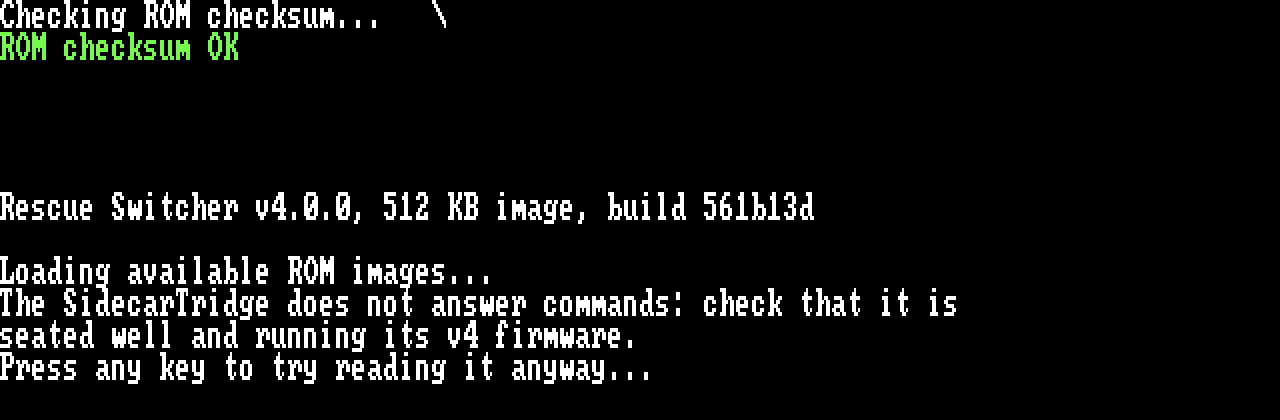
The rescue switcher started, but the board does not take its commands. Check that the board is well seated and runs firmware v4.0.0. A key tries anyway; if that fails too, it stops with “Error reading the flash page … Exiting.”: switch the Amiga off.
The rescue switcher says it is not compatible
- “This version of SWITCHER tool is not compatible with the firmware of the device.” is the rescue switcher 3.1.0 on firmware v4.0.0. Copy
RESCUE_SWITCHER_v4.0.0_512KB.imgto the drive and name it inRESCUE.TXT(Upgrading to firmware v4.0.0). - “This rescue switcher is not compatible with the device’s firmware.” is the rescue switcher 4.0.0 on an older firmware: update the firmware.
After either message, switch the Amiga off: the key leads nowhere.
“ROM checksum FAIL”
The rescue switcher’s image on the drive is damaged, or is not the published file. Copy it again from the downloads page and eject the drive.
Nothing happens after “Press any key to exit…”
Switch the Amiga off: the rescue switcher has nothing to go back to. Fix the cause the message gave, and switch it on again.
The Amiga does not start the ROM chosen in the rescue switcher
Switch the Amiga off and on: it then starts the chosen ROM.
The image I chose in the rescue switcher is no longer the default
v4.0.0
An image chosen in the rescue switcher is the default until the ROMEMUL drive is next ejected. The board then takes the default from DEFAULT.TXT again. To keep it, select it in the SWITCHER too, or write its name in DEFAULT.TXT.
Kickstart images and the ROMEMUL drive
Images copied via USB do not appear in SWITCHER
Eject the drive after copying: the eject is when the board adds them to its list.
Images copied from the Amiga via SWITCHER show old USB-copied entries
An upload from the SWITCHER rebuilds the list too, so it picks up images copied to the drive that were never ejected.
Manually editing DEFAULT.TXT and RESCUE.TXT has no effect
The board reads them when the drive is ejected. Save the file, then eject the drive.
After editing DEFAULT.TXT and RESCUE.TXT, the first image is selected instead
The name in the file does not match any image exactly. Check the spelling and the extension: the name must be exactly the file’s, up to 63 characters.
Errors ejecting the ROMEMUL drive
The host returns an error when ejecting/unmounting
A program is probably still using the drive. Close every program that may have it open, and try again. Also check:
- Third-party tools and drivers: some utilities and antivirus programs fill removable drives with hidden files. Disable them for the
ROMEMULdrive. - The USB-C cable: try another one that carries data.
- USB hubs: some work with the board and others do not. Try a port on the computer itself, or another computer.
Can’t change the RESCUE or DEFAULT/ACTIVE images from the host computer
The default image is the one the Amiga starts. Change it with the SWITCHER, or in DEFAULT.TXT on the drive.
The rescue image is your way back when nothing else starts, so it can only be changed in RESCUE.TXT on the drive; the SWITCHER cannot change it. With firmware v4.0.0, keep the rescue switcher 4.0.0 there: it can start any of your images.
Firmware v3.x only. Older guides described a way to change the rescue image from the SWITCHER:
- Edit
RESCUE.TXT. - Unplug the board without ejecting.
- In the SWITCHER, rename the new image to its own name.
Firmware v4.0.0 does not need it: edit RESCUE.TXT and eject the drive.